Take the Tour
(The tour is auto-generated from this jupyter notebook.)
Nutree organizes arbitrary object instances in an unobtrusive way.
That means, we can add existing objects without having to derive from a common
base class or implement a specific protocol.
from nutree import Tree

tree = Tree("Hello")
tree.add("N").add("u").up(2).add("T").add("r").up().add("ee")
tree.print()
Tree<'Hello'>
├── 'N'
│   ╰── 'u'
╰── 'T'
    ├── 'r'
    ╰── 'ee'
Strings can be directly added to a tree, but in a real-world scenario we want to handle ordinary objects:
Set up some sample classes and objects
Let’s define a simple class hierarchy
import uuid


class Department:
    def __init__(self, name: str):
        self.guid = uuid.uuid4()
        self.name = name

    def __str__(self):
        return f"Department<{self.name}>"


class Person:
    def __init__(self, name: str, age: int):
        self.guid = uuid.uuid4()
        self.name = name
        self.age = age

    def __str__(self):
        return f"Person<{self.name} ({self.age})>"
and create some instances
development_dep = Department("Development")
test__dep = Department("Test")
marketing_dep = Department("Marketing")

alice = Person("Alice", 25)
bob = Person("Bob", 35)
claire = Person("Claire", 45)
dave = Person("Dave", 55)
Now that we have a bunch of instances, let’s organize these objects in a hierarchical structure using nutree:
from nutree import Tree

tree = Tree("Organization")

dev_node = tree.add(development_dep)
test_node = dev_node.add(test__dep)
mkt_node = tree.add(marketing_dep)

tree.add(alice)
dev_node.add(bob)
test_node.add(claire)
mkt_node.add(dave)

tree.print()
Tree<'Organization'>
├── <__main__.Department object at 0x118c3fbc0>
│   ├── <__main__.Department object at 0x118646c30>
│   │   ╰── <__main__.Person object at 0x118c68170>
│   ╰── <__main__.Person object at 0x118c3f770>
├── <__main__.Department object at 0x118c3ffe0>
│   ╰── <__main__.Person object at 0x118c68bf0>
╰── <__main__.Person object at 0x118c3ffb0>
Tree nodes store a reference to the object in the node.data attribute.
The nodes are formatted for display by the object’s __repr__ implementation
by default.
We can overide this by passing an
f-string
as repr argument.
For example "{node.data}" will use the data instances __str__ method instead:
tree.print(repr="{node.data}")
Tree<'Organization'>
├── Department<Development>
│   ├── Department<Test>
│   │   ╰── Person<Claire (45)>
│   ╰── Person<Bob (35)>
├── Department<Marketing>
│   ╰── Person<Dave (55)>
╰── Person<Alice (25)>
Access Nodes
We can use the index syntax to get the node object for a given data object:
tree[alice]
Node<'Person<Alice (25)>', data_id=294404091>
We passed alice as index, which is an instance of Person, and received an
instance of the Node container
from nutree import Node

assert isinstance(tree[alice], Node)
assert tree[alice].data is alice, "nodes store objects in data attribute"
tree[alice].data
<__main__.Person at 0x118c3ffb0>
💡 Note
Even though we did not modify our objects to support a parent/child relationship,
we can use the tree container to achieve this:
# tree[alice].parent.data
tree[alice].get_siblings()
[Node<'Department<Development>', data_id=294404028>,
 Node<'Department<Marketing>', data_id=294404094>]
There are other other search methods as well
tree.find_all(match=lambda node: "i" in node.data.name)
[Node<'Person<Claire (45)>', data_id=294414359>,
 Node<'Department<Marketing>', data_id=294404094>,
 Node<'Person<Alice (25)>', data_id=294404091>]
Control the data_id
If the object instances have an attribute that naturally identifies them,
we can use it instead of the default hash().
This improves readability and may be more appropriate for serialization:
tree_2 = Tree("Organization", calc_data_id=lambda tree, data: str(data.guid))

dep_node_2 = tree_2.add(development_dep)
dep_node_2.add(bob)

tree_2.print(repr="{node}")
Tree<'Organization'>
╰── Node<'Department<Development>', data_id=f9d421b0-b672-4e8b-b6e0-228a65bb3db9>
    ╰── Node<'Person<Bob (35)>', data_id=c7da7f86-d5ec-4cb4-95eb-98f448a8470f>
now we could also search by the GUID, for example:
tree_2.find(data_id=str(bob.guid))
Node<'Person<Bob (35)>', data_id=c7da7f86-d5ec-4cb4-95eb-98f448a8470f>
Iteration and Searching
There are multiple methods to iterate the tree.
res = []
for node in tree:  # depth-first, pre-order traversal
    res.append(node.data.name)
print(res)
['Development', 'Test', 'Claire', 'Bob', 'Marketing', 'Dave', 'Alice']
from nutree import IterMethod

res = []
for node in tree.iterator(method=IterMethod.POST_ORDER):
    res.append(node.data.name)
print(res)
['Claire', 'Test', 'Bob', 'Development', 'Dave', 'Marketing', 'Alice']
def callback(node, memo):
    print(node.data.name, end=", ")


tree.visit(callback, method=IterMethod.LEVEL_ORDER)
Development, Marketing, Alice, Test, Bob, Dave, Claire,
The above traversal methods are also available for single nodes:
res = [node.data.name for node in dev_node]
print(res)
['Test', 'Claire', 'Bob']
Filter
We can create a filtered copy like so:
tree_copy = tree.filtered(lambda node: isinstance(node.data, Department))
tree_copy.print(repr="{node}")
Tree<"Copy of Tree<'Organization'>">
├── Node<'Department<Development>', data_id=294404028>
│   ╰── Node<'Department<Test>', data_id=294012611>
╰── Node<'Department<Marketing>', data_id=294404094>
In-place filtering is also available:
tree_copy.filter(lambda node: "m" in node.data.name.lower())
tree_copy.print(repr="{node}")
Tree<"Copy of Tree<'Organization'>">
├── Node<'Department<Development>', data_id=294404028>
╰── Node<'Department<Marketing>', data_id=294404094>
Mutation
We can add, copy, move, remove, sort, … nodes.
For example:
alice_node = tree[alice]
bob_node = tree[bob]

bob_node.move_to(mkt_node)
alice_node.copy_to(dev_node)

tree.print(repr="{node.data}")
Tree<'Organization'>
├── Department<Development>
│   ├── Department<Test>
│   │   ╰── Person<Claire (45)>
│   ╰── Person<Alice (25)>
├── Department<Marketing>
│   ├── Person<Dave (55)>
│   ╰── Person<Bob (35)>
╰── Person<Alice (25)>
Read the user guide for more ways to modify a tree.
Data IDs and Clones
In the example above, we duplicated the ‘Alice’ node, so we now have two node instances that reference the same data object, as we can see from the identical data_id:
tree.print(repr="{node}", title=False)
Node<'Department<Development>', data_id=294404028>
├── Node<'Department<Test>', data_id=294012611>
│   ╰── Node<'Person<Claire (45)>', data_id=294414359>
╰── Node<'Person<Alice (25)>', data_id=294404091>
Node<'Department<Marketing>', data_id=294404094>
├── Node<'Person<Dave (55)>', data_id=294414527>
╰── Node<'Person<Bob (35)>', data_id=294403959>
Node<'Person<Alice (25)>', data_id=294404091>
for clone in tree.find_all(alice):
    print(f"{clone}, parent={clone.parent}")
Node<'Person<Alice (25)>', data_id=294404091>, parent=None
Node<'Person<Alice (25)>', data_id=294404091>, parent=Node<'Department<Development>', data_id=294404028>
Special Data Types
Plain Strings
Plain strings are hashable objects, so we can handle them the same way as any other object:
tree_str = Tree()
a = tree_str.add("A")
a.add("a1")
a.add("a2")
tree_str.add("B")
tree_str.print()
Tree<'4710634976'>
├── 'A'
│   ├── 'a1'
│   ╰── 'a2'
╰── 'B'
Dictionaries
We cannot add Python dict objects to a tree, because nutree cannot derive
a data_id for unhashable types.
We can handle this by passing a data_id explicitly to add() and similar
methods, or implement a calc_data_id callback as shown before.
As another workaround, we can wrap it inside DictWrapper objects:
from nutree import DictWrapper, Tree

d = {"title": "foo", "id": 1}

tree = Tree()
tree.add("A").up().add("B")
tree["A"].add(DictWrapper(d))
tree["B"].add(DictWrapper(d))
tree.print(repr="{node}")
# tree.find(d)
Tree<'4710635408'>
├── Node<'A', data_id=-2533341272394772522>
│   ╰── Node<"DictWrapper<{'title': 'foo', 'id': 1}>", data_id=4710607488>
╰── Node<'B', data_id=-6081206409140482627>
    ╰── Node<"DictWrapper<{'title': 'foo', 'id': 1}>", data_id=4710607488>
Typed Trees
The TypedTree subclass adds a ‘kind’ attribute to the nodes, and related
methods.
This allows to organize objects in directed graphs:
from nutree import TypedTree

typed_tree = TypedTree()
typed_tree.add("Mia", kind="friend").add("Noah", kind="brother").up().add(
    "Olivia", kind="sister"
)
typed_tree.print()
TypedTree<'4710463776'>
╰── friend → Mia
    ├── brother → Noah
    ╰── sister → Olivia
Serialization
Nutree supports save/load in a compact native JSON format as well as
ZIP, RDF, DOT, and mermaid.
Even conversion to and SVG, PNG is possible:

Read the User Guide for different methods to save, load, or convert a tree to different output formats.
Diff
Given two trees, for example
Tree<'T0'>
├── Node<'Department<Development>', data_id={012-345}>
│   ├── Node<'Person<Alice, 23>', data_id={123-456}>
│   ╰── Node<'Person<Bob, 32>', data_id={234-456}>
╰── Node<'Department<Marketing>', data_id={012-456}>
    ├── Node<'Person<Charleen, 43>', data_id={345-456}>
    ╰── Node<'Person<Dave, 54>', data_id={456-456}>

Tree<'T1'>
├── Node<'Department<Development>', data_id={012-345}>
│   ╰── Node<'Person<Newman, 67>', data_id={567-567}>
╰── Node<'Department<Marketing>', data_id={012-456}>
    ├── Node<'Person<Alicia, 23>', data_id={123-456}>
    ├── Node<'Person<Charleen, 43>', data_id={345-456}>
    ╰── Node<'Person<Dave, 55>', data_id={456-456}>
We can generate a merged tree with additional annotations:
tree_2 = tree_0.diff(tree_1, compare=True, reduce=False)
tree_2.print(repr=diff_node_formatter)
Tree<"diff('T0', 'T1')">
├── Department<Development>
│   ├── Person<Newman, 67> - [Added]
│   ├── Person<Alice, 23> - [Moved away], [Modified]
│   ╰── Person<Bob, 32> - [Removed]
╰── Department<Marketing>
    ├── Person<Alicia, 23> - [Moved here], [Modified]
    ├── Person<Charleen, 43>
    ╰── Person<Dave, 54> - [Modified]
It is also possible to visualize as png, for example:
tree_2.to_dotfile("tree_diff.png", format="png", ...)

or with unique_nodes=True:
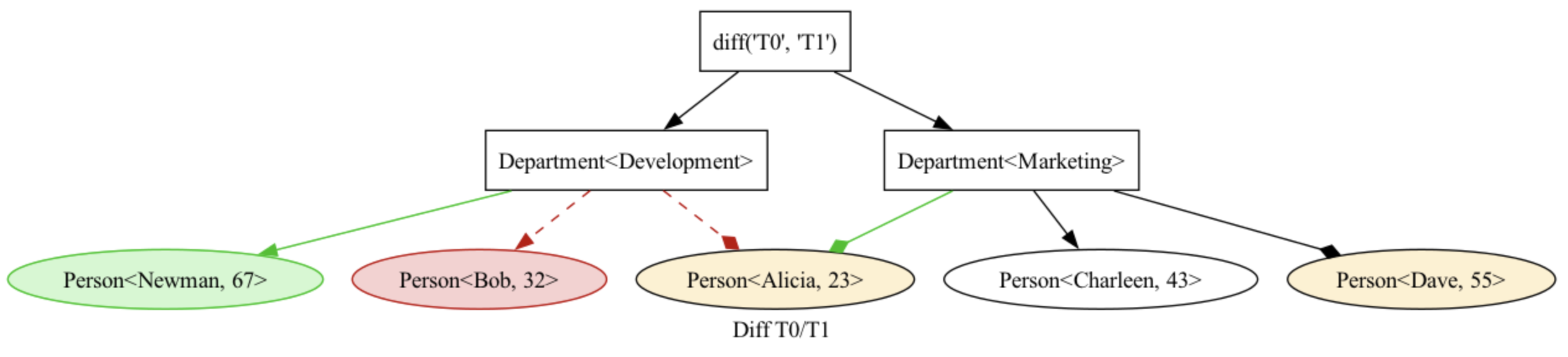
(See this example.)
Type Hints
Nutree comes fully typed (passing pyright standard checks). This improves type-safety and auto-complete features inside IDEs.
Assuming we have a hierrchy of objects:
class OrgaEntry:
    def __init__(self, name: str):
        self.name: str = name
        self.guid = uuid.uuid4()


class Person(OrgaEntry):
    def __init__(self, name: str, age: int):
        super().__init__(name)
        self.age: int = age


class Department(OrgaEntry):
    def __init__(self, name: str):
        super().__init__(name)
We can now create a type-safe tree to store these objects:
tree = Tree[OrgaEntry]()

dev = tree.add(Department("Development"))
alice = dev.add(Person("Alice", 25))

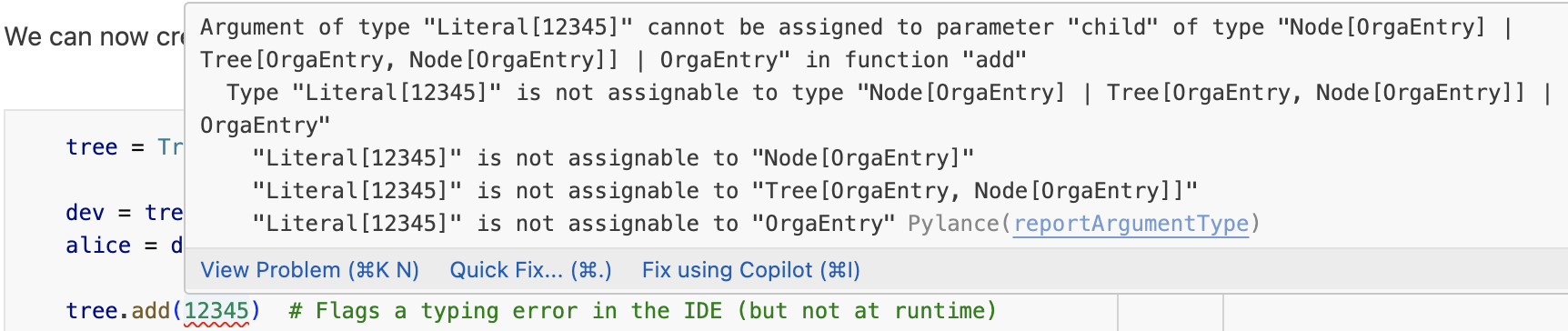
tree.add(12345)  # Flags a typing error in the IDE (but not at runtime)

# IDE infers that the type `OrgaEntry` is stored in the `data` attribute
# and provides code completion
print(alice.data.guid)
bb9db650-0f15-419b-8d58-d2d0aa6e55de
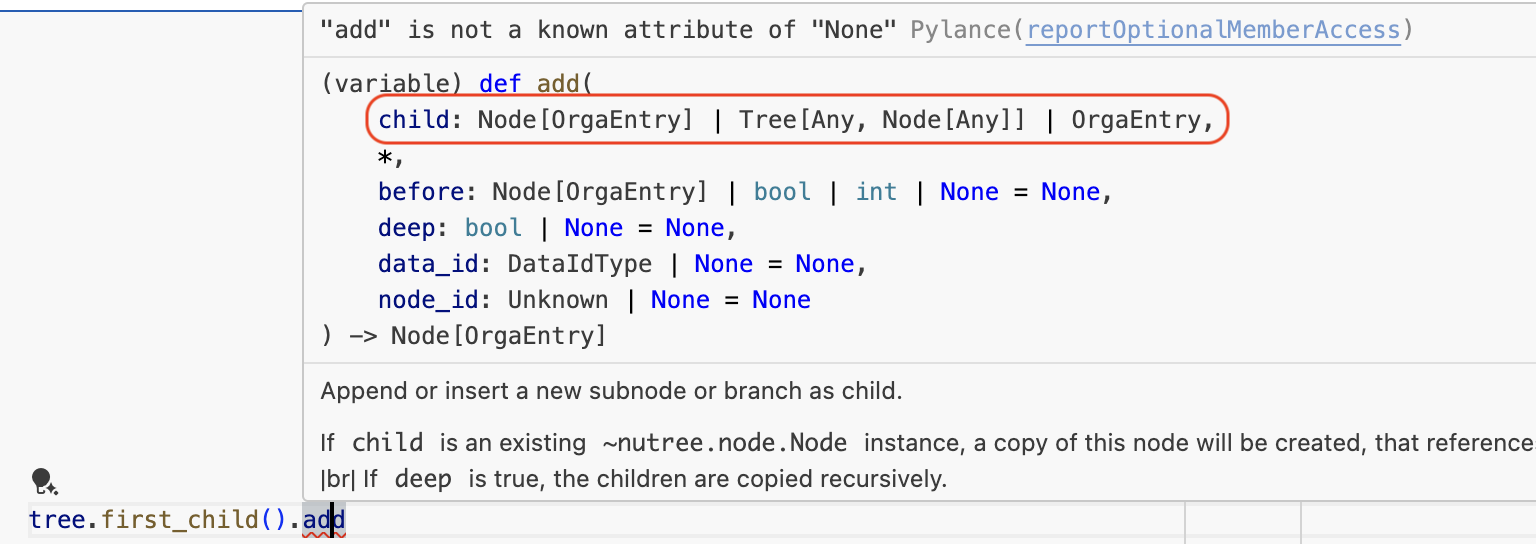
Note that the IDE can now make better suggestions
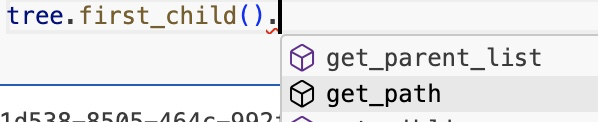
display type info
and detect type errors: